Why AI Agents Should Use Database MCP Servers
Published Updated 9 min read
AI AgentsMCPOracle MCP ServerEnterprise Security
This article is part 4 of 5 in the AI Engineering Reading Path.
AI coding agents such as Claude Code and GitHub Copilot can interact directly with relational databases as part of their software development tasks. However, before they can address the underlying problem, a significant portion of their context window and execution budget may be consumed by discovering database connectivity details and reverse-engineering the target database schema.
Integrating a dedicated Model Context Protocol (MCP)(opens in a new tab) server provides a practical way to address both dimensions of this problem. Database schema metadata can be exposed through dedicated MCP capabilities rather than reconstructed through exploratory queries. At the same time, a local stdio-based MCP server can manage database authentication on the developer workstation, allowing the agent to reference a named connection while the underlying credentials remain outside the model’s conversational context.
The following example is intended as a practical illustration rather than a controlled benchmark. I encountered this behavior while investigating an application issue with the assistance of Claude Code using Claude Fable 5. Instead of immediately addressing the application-level problem, the agent spent multiple turns determining how the local Oracle database was deployed and how it could connect to it. The database was running inside a Docker container hosted in a local WSL environment, requiring the agent to inspect the surrounding infrastructure before it could establish connectivity. Once connected, the agent constructed and executed exploratory SQL statements to reconstruct the schema.
The approach was effective: given sufficient time and database access, an AI agent can progressively reverse-engineer the portions of a relational schema relevant to the task at hand. The challenge is not whether the agent can discover this information, but the resources required to do so. The additional tool calls introduce latency, consume context-window capacity, and leave less of the agent’s available interaction budget for the actual troubleshooting task. This is not unique to my experience. AWS describes an Aurora DSQL MCP workflow in which an agent first discovers the database schema and then assembles the SQL query required to answer the user’s question. AWS reports anecdotally(opens in a new tab) that this workflow typically requires an additional two to three event-loop iterations to generate a valid SQL query, illustrating the interaction overhead that database discovery can introduce.
I refer to this recurring cost as Database Schema Discovery Overhead: the computational and interaction effort an AI agent must expend to reconstruct the database schema required for a task.
To address this, I integrated Oracle’s official SQLcl MCP Server(opens in a new tab). The SQLcl MCP Server is available for download under Oracle’s Free Use Terms and Conditions(opens in a new tab), without requiring an Oracle account. It supports Oracle Database 19c and later. The example in this article was tested with Oracle Database 19c.
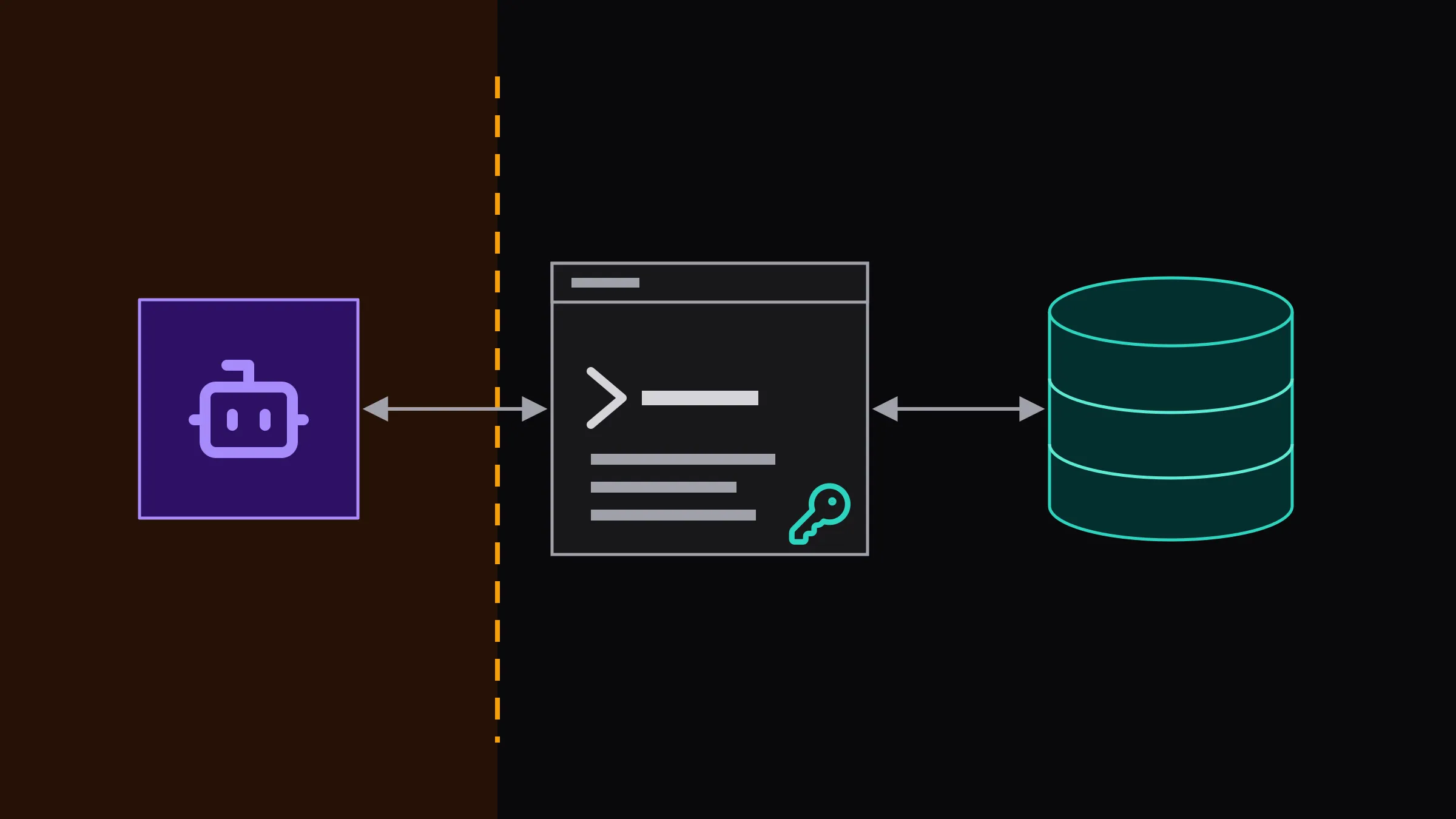
Instead of forcing the AI agent to discover database structure through exploratory SQL queries, SQLcl’s MCP server exposes a dedicated schema-information tool for retrieving metadata not only for the connected user’s schema, but also for other schemas accessible to the connected database account. The same architectural direction is now visible across major cloud platforms: AWS exposes a dedicated get_schema capability in its Aurora DSQL MCP Server, while Google Cloud provides managed MCP servers(opens in a new tab) for multiple database products so agents can interact with current enterprise data through standardized interfaces. Figure 1 traces the process and trust boundaries this architecture establishes.
For AI-assisted troubleshooting, this distinction is important. A database MCP server acts as a database-aware abstraction layer between the agent and the database, exposing capabilities that would otherwise need to be reconstructed through lower-level operations.
MCP does not make schema discovery disappear; it turns schema discovery from a sequence of exploratory queries into an explicit, controllable capability. When combined with targeted retrieval and filtering, it can also reduce the amount of irrelevant schema context exposed to the model. Table 1 summarizes the tools the SQLcl MCP Server exposes.
| SQLcl MCP Server tool | Purpose |
|---|---|
list-connections |
Enumerates the named connections saved on the workstation |
connect / disconnect |
Opens or closes a session against one named connection |
run-sql |
Executes SQL and PL/SQL against the connected database |
run-sqlcl |
Executes SQLcl client commands, subject to the restriction level |
schema-information |
Returns structured metadata for the accessible schemas |
Tools exposed by the SQLcl MCP Server. Only schema-information addresses the discovery problem
discussed here; the remainder constitute the general database interface.
A reasonable alternative is to provide the AI agent with a generated schema file or existing database artifacts such as Flyway migrations, JPA entities, or ORM mappings. This can eliminate schema discovery, but it does not eliminate the connectivity discovery described above: the agent may still need to determine where the database is running, how it is exposed, and how to connect to it. Moreover, repository artifacts describe the intended or application-level schema and may not fully represent the current state of the running database, particularly when environments have diverged or changes have been applied outside the normal migration workflow.
For debugging, the distinction matters because the live database can provide information that static schema artifacts cannot, including the current state of database objects and runtime characteristics. At enterprise scale, a complete repository representation of a multi-thousand-table database can also create a large context payload unless the relevant metadata is selectively retrieved.
The way database authentication is handled is equally important. A naive integration could expose connection strings, usernames, passwords, wallets, or other connection material directly to the model or to prompts and configuration files that form part of the agent’s working context. That creates an unnecessary credential-exposure surface: credentials placed in the model’s context may become part of the data processed, logged, or retained by the AI system, depending on the provider and deployment configuration.
SQLcl’s MCP Server addresses this security issue by using previously saved database connections. Oracle stores these connections in the SQLcl connection store. On Linux and macOS, the store is located under ~/.dbtools. On Windows, it is located under %APPDATA%\DBTools. Saved passwords are encrypted at rest. For an MCP client to use a connection, its password must be saved in the connection store. The agent can then discover and use the saved connection without requiring the database password to be provided in the conversation. Listing 1 shows how such a connection is created.
C:\sqlcl\bin> sql /nolog

SQL> conn -save my-test-db-connection -savepwd <user>/<password>@//<host>:<port>/<service>
Name:           my-test-db-connection
Connect String: //localhost:1521/testdb
User:           testuser
Password:       ******
Connected.

SQL> cm list
|___ my-test-db-connection
Creating a saved connection. The -savepwd flag is mandatory: the MCP server accepts no
credentials at runtime and can open only those connections whose password is already in the
store. From that point the agent refers to the connection solely by its name.
This should not be interpreted as making database access inherently secure. The MCP server exposes database capabilities to the AI agent, while the database account’s privileges determine which of those operations the agent can actually perform. Oracle explicitly recommends applying least-privilege permissions to the database account used by the MCP server and avoiding direct connections to production databases from AI agents.
As additional control, SQLcl supports restrict levels that limit which SQLcl commands are available through the MCP server; Table 2 lists what each level blocks. Since SQLcl 26.1.2, however, the MCP server starts unrestricted by default unless a restrict level is explicitly configured — a change recorded in the SQLcl 26.1.2 release notes(opens in a new tab), which state that startup was previously set to restriction level 4. Restrict levels apply to SQLcl functionality such as host commands and scripts, not to SQL execution itself. An agent’s effective database capabilities are therefore ultimately determined by the privileges of the underlying database account. Because the restrict level is configured locally when the MCP server is started, it should be viewed as an additional safeguard rather than a centrally enforced security control. The primary security boundary remains the database account and its granted privileges. Listing 2 registers the server with Claude Code at the strictest level, and Listing 3 shows the configuration that registration produces.
C:\> claude mcp add --scope user sqlcl -- "C:\sqlcl\bin\sql.exe" -R 4 -mcp
Registering the server with an explicit restriction level. Everything after the -- separator
is the command used to start the server.
"mcpServers": {
  "sqlcl": {
    "type": "stdio",
    "command": "C:\\sqlcl\\bin\\sql.exe",
    "args": ["-R", "4", "-mcp"],
    "env": {}
  }
}The resulting client-side configuration. The restriction level is a property of this local file, which is precisely why it constitutes a workstation default rather than a centrally enforced control.
| Level | Commands blocked, cumulatively |
|---|---|
-R 1 |
Operating-system command execution (host, !, $) |
-R 2 |
Level 1 plus file output (spool, save, store) |
-R 3 |
Level 2 plus script execution (@, @@, start) |
-R 4 |
Level 3 plus approximately one hundred further SQLcl commands |
SQLcl restriction levels. The levels are cumulative, and none of them constrain SQL itself: DML and DDL remain governed exclusively by the privileges of the database account.
A useful security boundary should also provide visibility into the activity that crosses it. SQLcl MCP provides several database-side mechanisms for identifying and recording agent activity. This makes MCP-generated database activity easier to distinguish from ordinary application traffic:
- Session attribution:
V$SESSION.MODULEidentifies the MCP client, whileV$SESSION.ACTIONidentifies the LLM or model in use. DBAs can therefore identify active MCP sessions through standard Oracle monitoring views. - Statement tagging: SQL statements executed through SQLcl MCP include a comment such as
/* LLM in use is <model> */. This makes agent-generated SQL identifiable in database SQL monitoring and logging facilities. - Activity logging: SQLcl MCP records MCP interactions and SQL executions in the
DBTOOLS$MCP_LOGtable. The log includes information such as the MCP client, model, endpoint type, endpoint name, and log message.
Listing 4 shows both attribution surfaces queried from the database side.
-- Agent sessions currently connected
SELECT sid, username, module, action, program
  FROM v$session
 WHERE module LIKE '%MCP%';

-- Agent-generated statements retained in the shared pool
SELECT sql_id, parsing_schema_name, sql_text
  FROM v$sql
WHERE sql_text LIKE '%LLM in use is%';Identifying agent activity from the database side. Attribution of this kind is not available when an agent improvises a connection through a generic client.
This provides an important operational advantage over an agent that establishes a database connection through a generic client: the database can distinguish MCP-mediated activity through session attributes and SQL annotations.
There are, however, important limitations. DBTOOLS$MCP_LOG is stored in the database and should not be treated as a tamper-evident audit trail by itself. For stronger audit requirements, organizations should use appropriate database auditing mechanisms, such as Unified Auditing.
A second limitation concerns human attribution. The database session identifies the MCP client and model, but this does not necessarily identify the individual developer operating the agent. Organizations requiring user-level attribution should provision separate database accounts or establish an additional identity and audit mechanism.
MCP introduces a cost that should not be overlooked. An MCP server exposes tool definitions to the AI client, and these definitions can consume context even when the database is not ultimately used during a particular session. With multiple MCP servers connected, the cumulative context required to describe available tools can become significant.
Modern AI clients are increasingly addressing this issue through mechanisms such as deferred or on-demand tool loading, which can reduce the amount of tool-definition context present before a capability is needed. The practical efficiency therefore depends not only on the MCP server itself, but also on how the MCP client manages tool discovery and context.
Oracle’s SQLcl MCP Server moves database discovery from multi-turn exploratory queries to explicit MCP capabilities. Its dedicated schema-information tool can retrieve metadata directly, including information for schemas accessible to the connected database account. Since SQLcl 26.1, the tool also supports filtering the metadata returned, allowing the agent to request only the information relevant to its task. At the same time, saved named connections allow database authentication material to remain outside the model’s conversational context.
For enterprises adopting AI-assisted development, the broader lesson is that agent efficiency and governance are increasingly influenced by the interfaces through which agents access enterprise systems. A database MCP server is therefore not simply a convenience for executing SQL. Properly configured, it can reduce interaction overhead and diagnostic latency, preserve credential isolation, and provide a clearer governance boundary between AI agents and enterprise databases. When the MCP server supports targeted schema retrieval and filtering, it can also reduce the amount of irrelevant schema context presented to the model, potentially improving token efficiency on large database schemas.
Share this article